If you want to know how to stay safe from hackers, you are asking the right question at the right time. Cyber attacks don’t only happen to big banks and governments. Regular people — students, parents, small business owners — get targeted every single day.
The good news? You don’t need to be a tech expert to protect yourself. Most hackers aren’t chasing hard targets; they look for easy ones. If you make yourself just a little harder to hack than the average user, you avoid the vast majority of attacks.
This guide covers everything: what cyber security actually means, how to protect your phone and computer, how to keep your social media and bank accounts safe, and practical steps to protect yourself in India.
What Is Cyber Security, and Why Are You a Target?
Cyber security is simply the practice of protecting your devices, accounts, and personal details from people who want to steal or misuse them. It works just like locking your front door, but for your digital life.
You might think, “I am an ordinary person, why would a hacker target me?” But that is exactly why everyday users get hit. Hackers rarely target one specific individual. Instead, they send out thousands of automated fake emails, texts, and harmful links, knowing a certain percentage of people will click.
How Most Cyber Attacks Actually Happen
- You click a link in a message that looks genuine but leads to a fake login page.
- You download an app or file that secretly carries background malware.
- You reuse the same weak password across multiple websites.
- You connect to open, unsecured public Wi-Fi without encryption.
- Someone tricks you into sharing personal details or OTPs over a phone call or chat.
Understanding the Threat: 4 Types of Cyber Attacks You Should Know
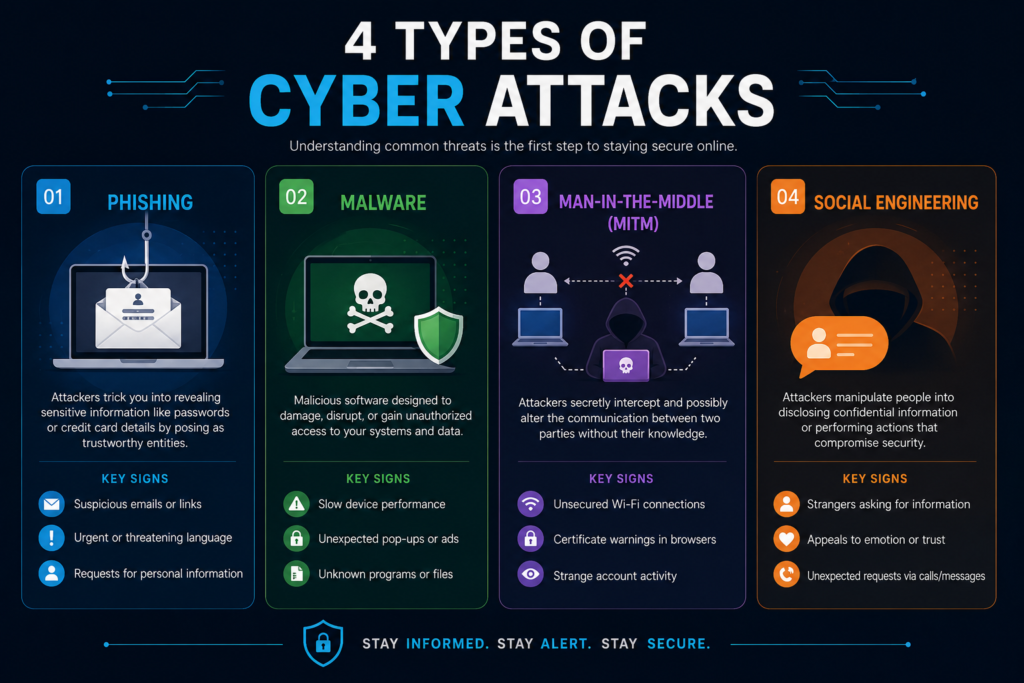
To protect against cyber threats effectively, you first need to recognize the attack methods.
1. Phishing
Phishing is when an attacker sends a fake email, SMS, or direct message pretending to be a trusted organization — like your bank, courier service, or a popular app. The goal is to trick you into entering credentials or clicking dangerous links.
Warning Signs: Urgent deadlines (“Your account will be suspended in 2 hours!”), subtle spelling errors in domain names, and generic greetings.
2. Malware and Ransomware
Malware refers to harmful software that silently installs on your device. Ransomware is an aggressive subset: it encrypts your personal files, photos, and documents, demanding a ransom payment to restore access.
3. Man-in-the-Middle (MitM) Attacks
This occurs when an attacker intercepts communication between your device and the internet — most commonly over unprotected public Wi-Fi networks. They can passively read unencrypted network traffic, including login credentials and payment sessions.
4. Social Engineering
Social engineering exploits human psychology rather than technical flaws. Scammers pose as bank executives, IT support staff, or authority figures to manipulate victims into voluntarily transferring funds or handing over verification codes.
How to Keep Your Phone Safe from Hackers (Android & iPhone)
Your smartphone stores your most sensitive personal information, including banking apps, private chats, photos, and location logs.
How to Block Hackers from Your Android Phone for Free
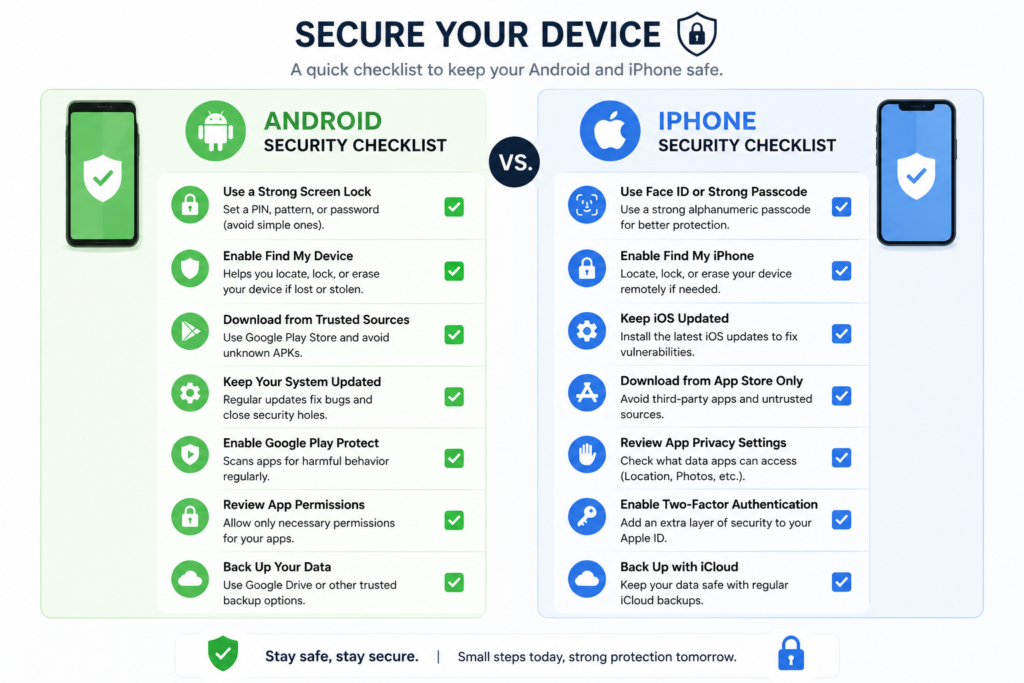
- Enable Automatic OS Updates: Go to Settings > System > Software Update to patch known security flaws.
- Stick to the Google Play Store: Avoid downloading third-party APK files directly from unknown websites or forums.
- Audit App Permissions: Open Settings > Apps > Permission Manager and revoke access to the camera, microphone, and location for apps that do not strictly need them.
- Turn on Google Play Protect: Verify it is active in the Play Store settings to continuously scan apps for suspicious behavior.
- Set a Strong Screen Lock: Use a 6-digit PIN, alphanumeric password, or biometric lock. Disable lock screen notification previews for sensitive codes.
- Avoid Open Wi-Fi: Turn off auto-connect for public Wi-Fi networks, or use an encrypted VPN.
How to Protect an iPhone from Hackers
- Keep iOS Updated: Navigate to Settings > General > Software Update and turn on automatic updates.
- Use Face ID / Strong Passcode: Avoid simple passcodes like 1234 or repeated digits.
- Enable Find My iPhone: Ensure “Send Last Location” and remote wipe features are active in your iCloud settings.
- Turn on 2FA for Apple ID: Protect your iCloud account from unauthorized device logins.
- Check App Privacy Reports: Go to Settings > Privacy & Security to see which apps have accessed your data recently.
- Filter Unknown Senders: In Message settings, turn on “Filter Unknown Senders” to keep suspicious links out of your primary inbox.
Warning Signs Your Phone Might Be Compromised
| Warning Sign | What It Might Mean |
|---|---|
| Battery drains unusually fast | Malicious background processes continuously running |
| Phone feels hot while idle | Background software consuming excessive CPU cycles |
| Unexpected spike in mobile data | Hidden spyware transmitting data to remote servers |
| Pop-up ads appearing on home screen | Adware or unauthorized apps installed |
| Device runs sluggishly or freezes | Memory exhaustion from hidden background apps |
| Unrecognized outgoing SMS or calls | Premium SMS fraud or unauthorized remote access |
Computer & Home Network Security: 10 Essential Protection Steps
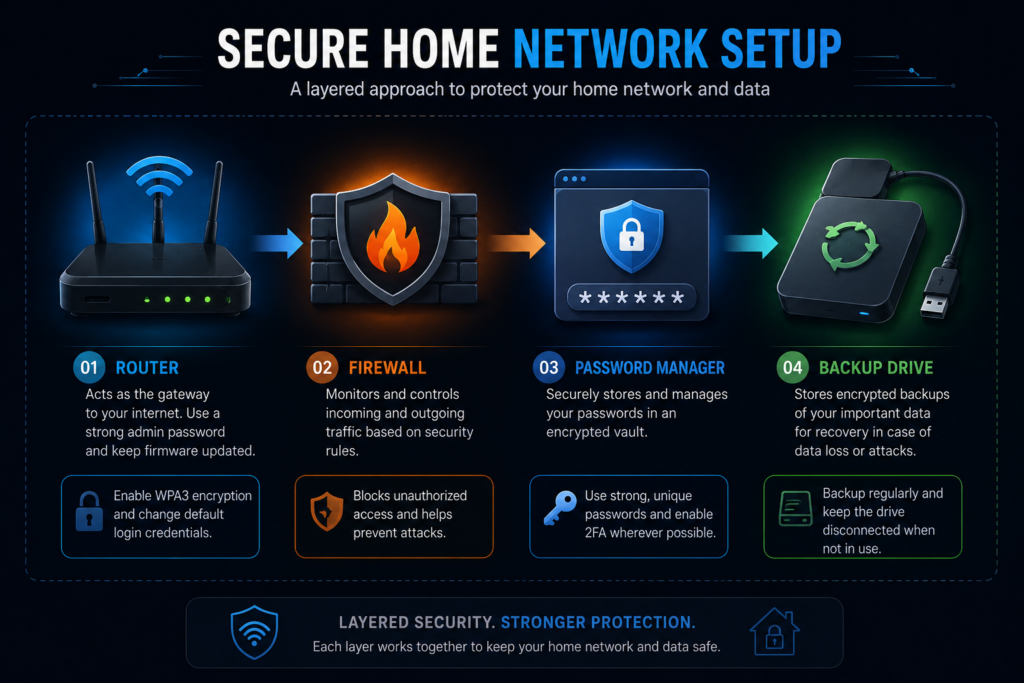
- Turn on Automatic Updates: Keep Windows, macOS, and third-party software patched against zero-day exploits.
- Keep the Firewall Active: Ensure the native Windows Defender Firewall or macOS Firewall is enabled.
- Use a Reliable Antivirus Tool: Schedule automated weekly full-system scans.
- Use a Password Manager: Generate unique 16+ character passwords for every single website and avoid browser-saved plain text passwords.
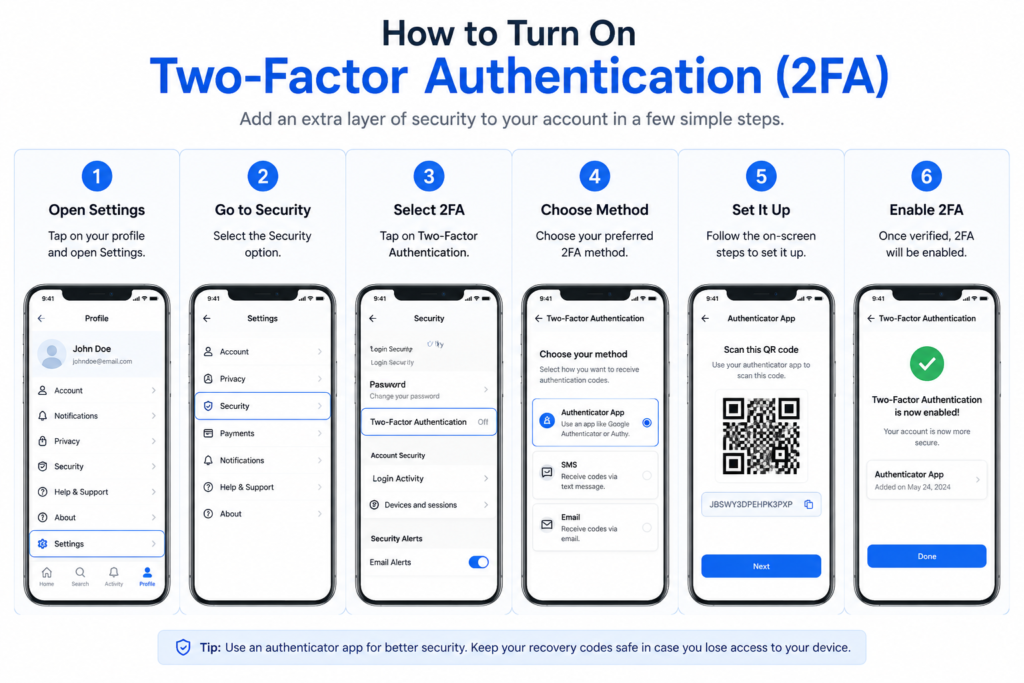
- Enforce Two-Factor Authentication (2FA): Use app-based authenticators (like Google Authenticator or Aegis) rather than SMS where possible.
- Maintain Offline Backups: Follow the 3-2-1 backup rule (3 copies of data, 2 different media types, 1 stored offline/offsite) to defend against ransomware.
- Filter Suspicious Attachments: Never open .exe, .scr, .vbs, or macro-enabled .docm files from unsolicited emails.
- Harden Your Home Router: Change the default router administrator password, update its firmware, and set encryption to WPA2-AES or WPA3.
- Isolate IoT Devices: Create a separate Guest Wi-Fi network for smart TVs, smart bulbs, and home appliances so they cannot touch your main computer network.
- Disable Remote Router Access: Turn off “Remote Management / WAN Access” in your router’s admin panel.
Securing Your Online Accounts and Social Media
How to Be Safe from Hackers on Instagram
- Enable 2FA under Settings > Accounts Center > Password and Security > Two-Factor Authentication.
- Review active sessions under Where You’re Logged In and immediately log out of unfamiliar devices.
- Never click on links in DMs promising “Copyright Infringement Appeals” or “Meta Verified Badges.”
How to Keep WhatsApp Safe from Hackers
- Set up a 6-digit PIN under Settings > Account > Two-Step Verification.
- Never forward or read out your 6-digit SMS registration code to anyone over a call.
- Enable Silence Unknown Callers under Settings > Privacy > Calls.
- Periodically check Linked Devices and revoke access for any inactive or unknown browser sessions.
How to Keep Your Roblox Account Safe
- Enable 2-Step Verification via an Authenticator App in Account Settings.
- Enable an Account PIN to prevent unauthorized email or password changes inside the client.
- Never input credentials on third-party websites offering “Free Robux” or game asset trades.
How to Keep Your Bank Account Safe
- Never disclose your ATM PIN, CVV, Net Banking password, or OTP to anyone under any circumstance.
- Ensure instant SMS and email transaction alerts are active on your account.
- Use only the bank’s verified mobile app from official stores.
- Set low daily transaction limits on debit cards, international usage, and UPI.
Protecting Small Businesses and Organizations
- Employee Security Awareness: Conduct basic training on how to identify spear-phishing emails and verify payment requests.
- Principle of Least Privilege (PoLP): Restrict system access so staff only have permission to reach files necessary for their role.
- Endpoint Protection: Install business-grade endpoint security on all laptops and workstations.
- Server Hardening: Keep server operating systems patched, disable unused open ports, and enforce SSH key-based authentication while disabling remote root logins.
- Encrypted Storage: Enforce full-disk encryption (such as BitLocker or FileVault) on all employee laptops.
Staying Cyber Safe in India: Region-Specific Advice
Common Scams in India
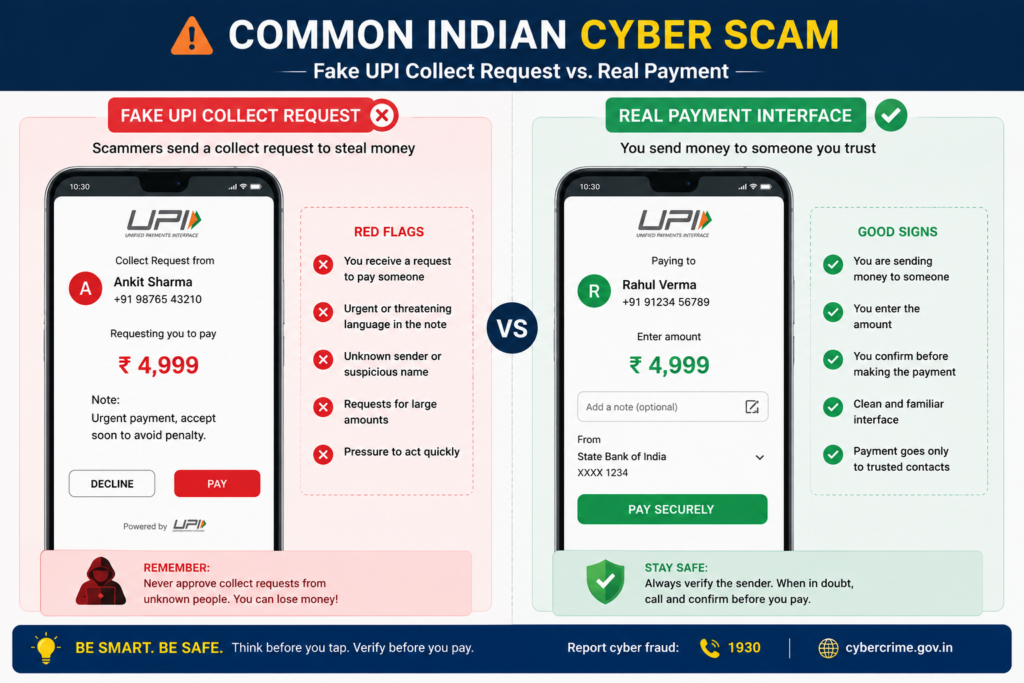
- Fake UPI Collect Requests: Scammers send a “Collect Request” via UPI apps claiming it is required to receive cashback or a refund. Rule: You never enter your UPI PIN to receive money.
- Electricity Bill / SIM KYC Scams: Fraudulent SMS messages claiming your power will be disconnected or SIM blocked tonight unless you call an unauthorized number or download a remote-access app (like AnyDesk or TeamViewer).
- Fake Customer Care Numbers: Fraudulent search engine listings displaying scam numbers for courier companies, airlines, and banks. Always find support contacts inside the official app.
- Part-Time Task Scams: Telegram and WhatsApp messages offering daily income for rating hotels or liking videos, which transition into high-risk investment traps.
How to Report Cybercrime in India
- Call 1930: The National Cyber Financial Fraud helpline allows immediate coordination with banks to freeze transferred funds before cash-out.
- File a Formal Complaint: Submit details, screenshots, and transaction IDs to the official portal: cybercrime.gov.in.
- Notify Your Bank: Request an immediate block on compromised cards, Net Banking access, or UPI handles.
Frequently Asked Questions
How do I prevent hackers?
Preventing hackers relies on layered security: use long and unique passwords with a password manager, turn on multi-factor authentication (MFA), install regular OS updates, and maintain a cautious approach to unknown links and downloads.
What are 5 ways we can be cyber safe?
- Use strong, unique passwords for every platform.
- Enable two-factor authentication on all major accounts.
- Keep all operating systems and apps updated.
- Verify sender authenticity before clicking links or downloading files.
- Back up essential data regularly to an offline storage drive.
What do hackers hate the most?
Hackers dislike friction. Automated attacks look for unsecured devices and reused passwords. Setting up two-factor authentication, keeping software patched, and avoiding predictable passwords forces attackers to spend significant effort, causing them to move on to easier targets.
How do I catch a hacker?
Do not attempt to track down attackers or “hack back,” as unauthorized system access is illegal. Instead, preserve the evidence (save full email headers, chat screenshots, and transaction IDs) and report the incident directly to law enforcement cyber cells or official national portals.
Final Checklist: Quick-Reference Cyber Safety Summary
| Area | Primary Action Items |
|---|---|
| Passwords | Unique password per account; store via a reputable password manager |
| Two-Factor Auth | Activate app-based 2FA on email, banking, social, and gaming profiles |
| Smartphones | Keep OS auto-updated, check permission managers, download only from official stores |
| Computers | Enable built-in firewalls, run regular scans, secure offline backups |
| Home Network | Change default router password, set WPA2/WPA3, create a separate IoT guest network |
| Social Media | Check active login sessions, turn on 2FA, ignore phishing DMs |
| Banking & UPI | Never enter a PIN to receive funds, verify recipient names, set daily transaction caps |
| Incident Response | Reset master passwords immediately, notify financial institutions, report via 1930 / cybercrime.gov.in |
Summary
Staying secure online does not require advanced technical expertise. It comes down to consistent digital hygiene: keeping devices updated, using distinct passwords, enabling two-factor authentication, and double-checking payment prompts. Taking a few proactive steps today protects your personal identity, devices, and financial data for the long run.